
CBZ Forge
Comic Converter · macOS
Convert your comics to CBZ. Every page copied, or explained.
CBZ Forge turns the PDF, CBZ, and CBR files you already own into clean CBZ archives, copying each page’s original image across untouched. When it can’t, it tells you which page, and why.
Built for people who keep a comic library and intend to keep it.
Requires macOS 26 (Tahoe) or later · Apple silicon and Intel
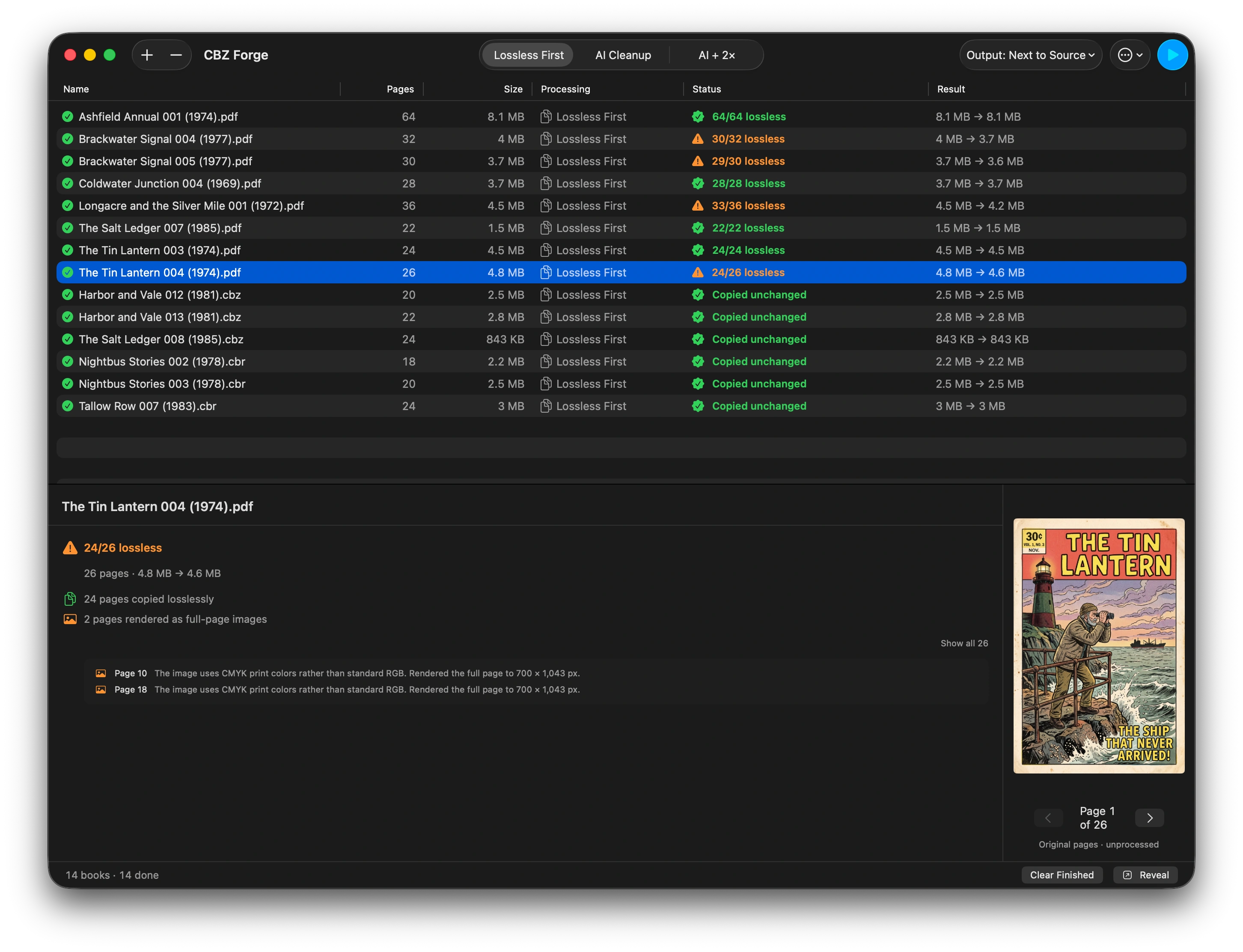
Watch it work
A real conversion, start to finish: a PDF graphic novel going in, and a verdict for every page coming out.
Works on the comics you already own
It opens what is already on your disk and writes a new archive next to it. That is the whole job.
- Your files, your disk
- No store, no library, no browsing or search. Nothing is fetched.
- DRM-free only
- Encrypted and password-protected files are refused, not cracked. CBZ Forge does not remove DRM.
- Originals untouched
- Every conversion writes a new archive and leaves the source exactly as it was.
- Fully offline
- The app ships without the network entitlement, so it cannot make a connection at all.
Why it matters
Your library, carried across intact.
-
Change the format, not the pixels
Pages are extracted byte-for-byte from the source, not re-encoded. What goes into the CBZ is the image that was already in your file. A JPEG stays that JPEG, with no generational loss.
-
Know exactly what happened
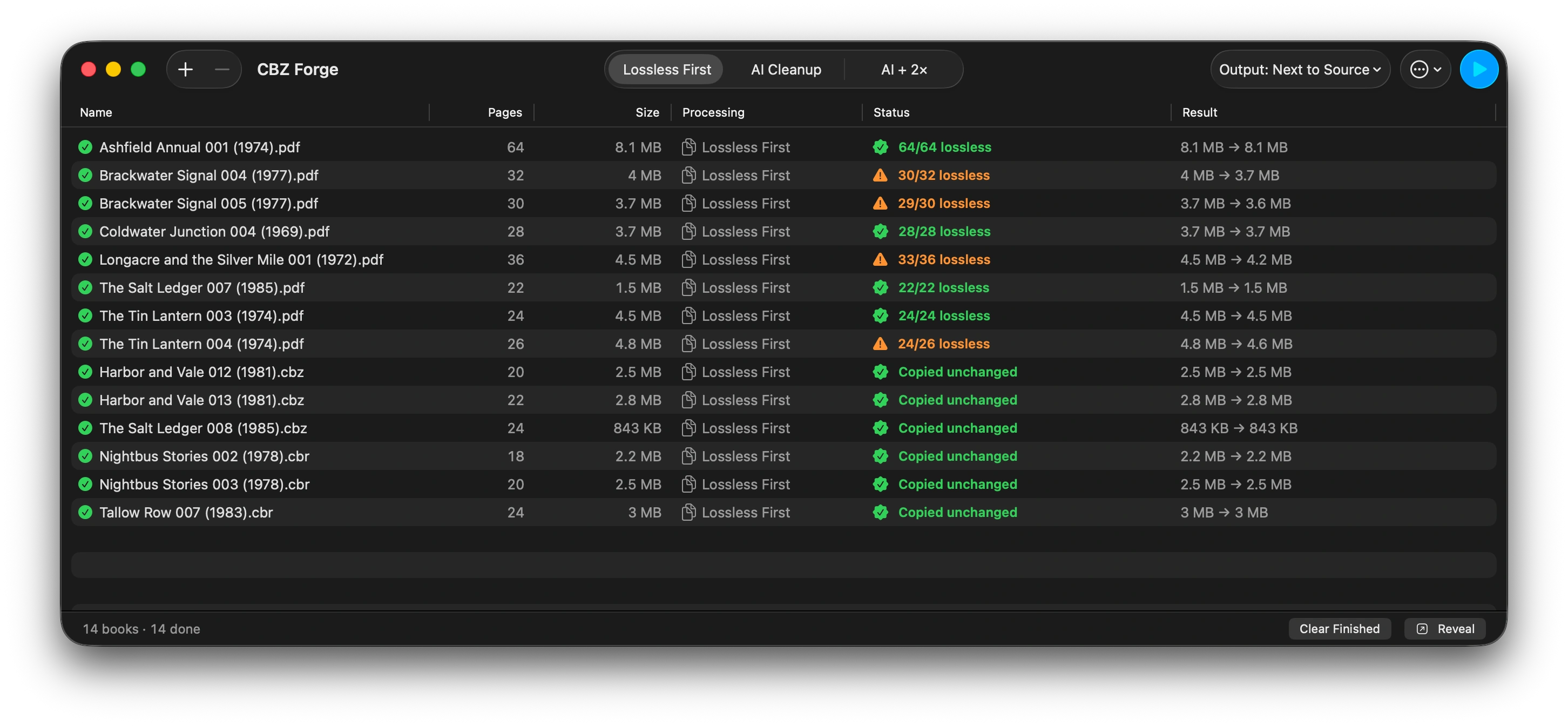
Every page gets a verdict. Anything that could not be copied cleanly is listed with the reason, so you are never guessing whether a conversion cost you quality.
-
Convert a whole shelf at once
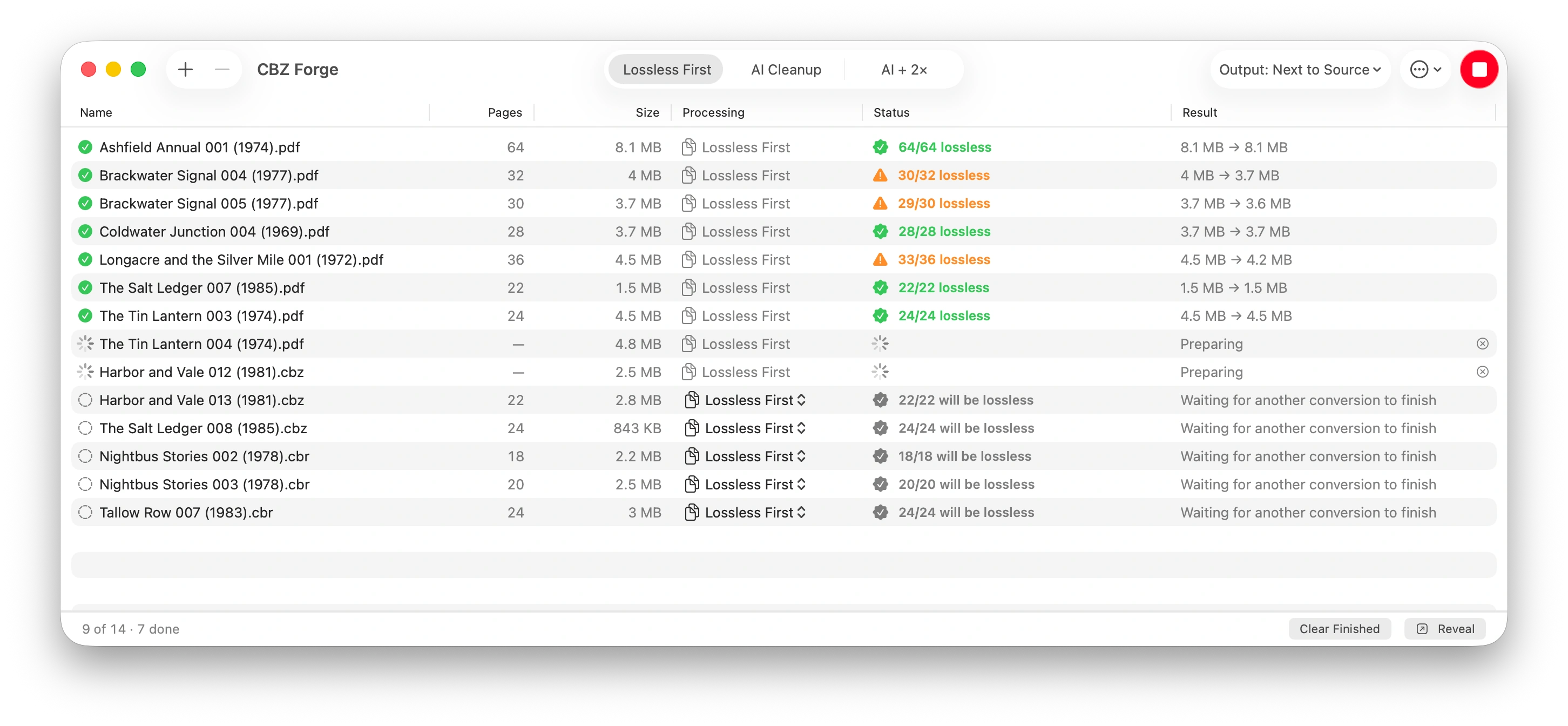
Drop in a folder and walk away. Two conversions run at a time with live progress, and each book explains itself when you click it.
-
Optional AI cleanup, honestly labeled
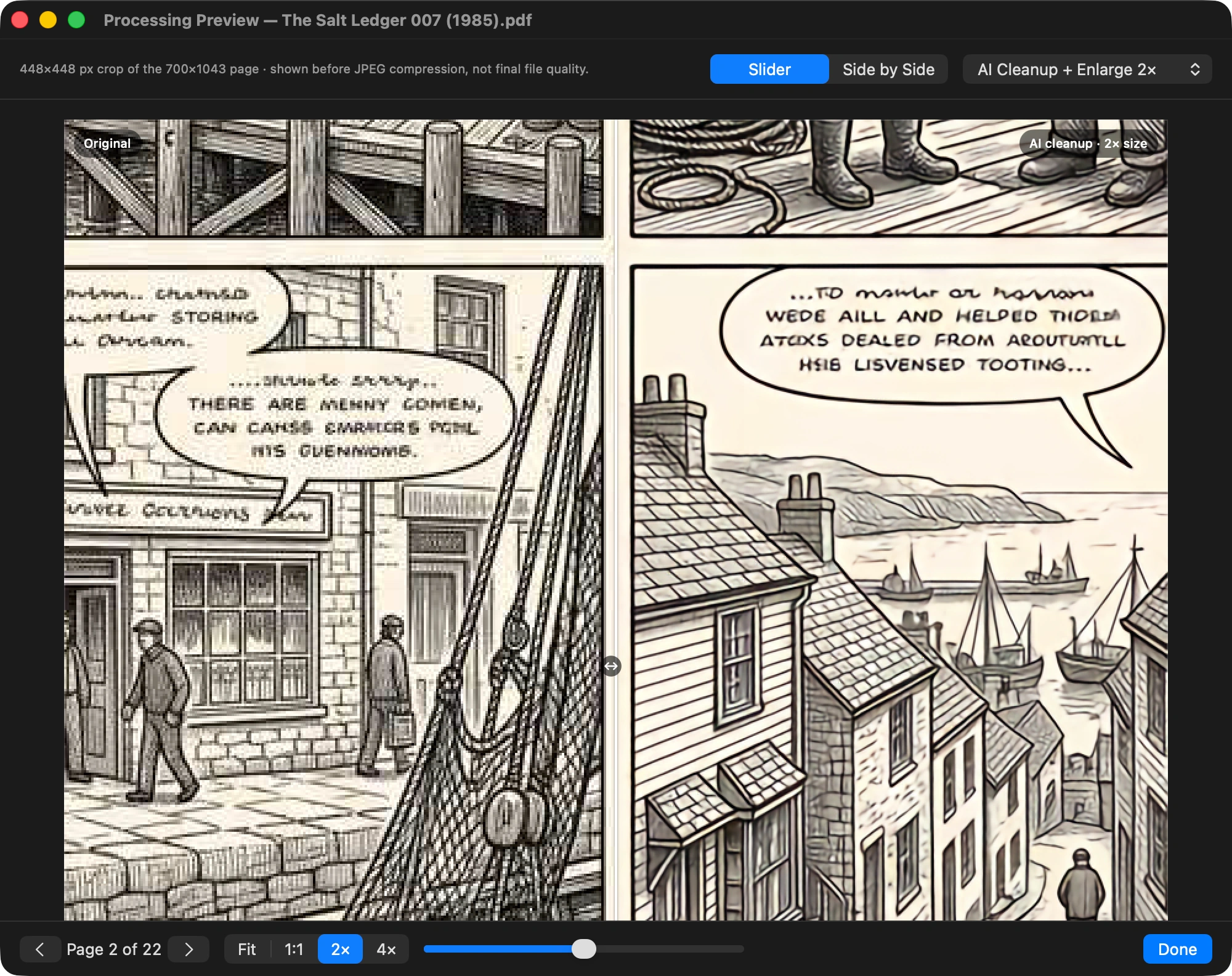
Clean up or double the size of older scans with an on-device model. It stays off until you ask for it, and what it produces is labeled processed rather than lossless, because rewriting pixels isn’t.
The app
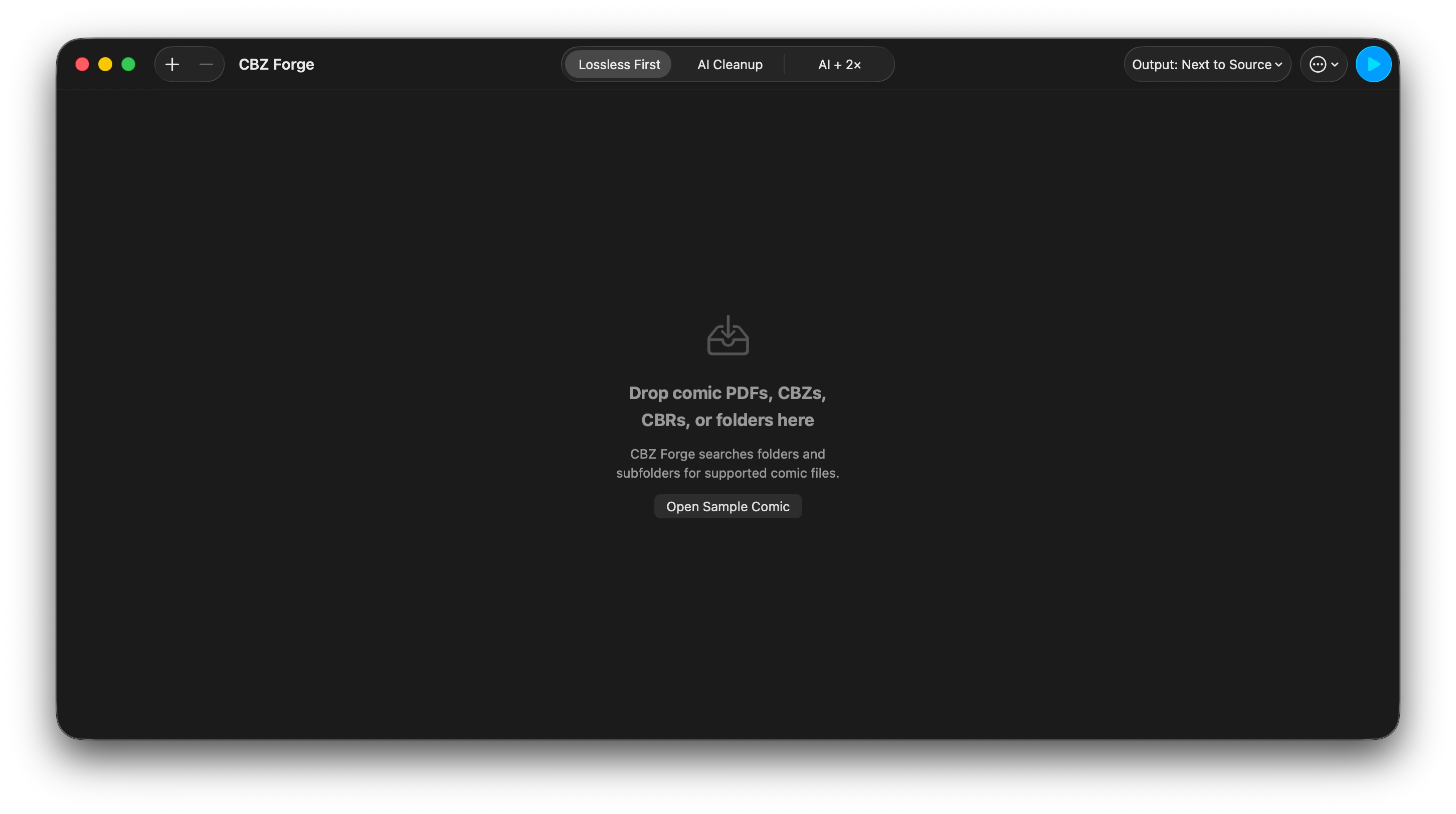
A converter that shows its work.
Under the hood
Built to be checked.
- Byte-for-byte page extraction
- Where a page’s embedded image can be carried across untouched, it is. The exact bytes already in your file go straight into the CBZ. No re-encoding, no quality slider, no guessing.
- An honest fallback, with the reason attached
- Some pages genuinely cannot be carried across untouched. Those are labeled with the reason: page rotation, masks, painted overlays, optional content, CMYK print colors. Most are rendered at their inherent DPI; a CMYK page is converted to RGB and re-encoded at its original pixel size, and only renders if that fails verification. A converter that pretends otherwise is lying to you.
- Batch CBZ conversion that skips its own work
- Drop a folder and every supported comic inside it is found, subfolders included. Two books convert at a time with live per-page progress, and books you have already converted are recognized and skipped rather than silently redone.
- Metadata that survives the trip
- An existing
ComicInfo.xmlis copied byte-for-byte and never enters an XML parser or reserializer, so unknown fields, element order, and encoding survive exactly. Tools that round-trip XML routinely drop fields they don’t recognize; this one doesn’t look. Archives without metadata get a deterministic ComicInfo 2.0 written for them—page count and nothing invented. - Optional AI cleanup, built for line art
- The bundled Real-CUGAN model was trained on illustration and line art rather than photographs: flat color, hard ink edges, screentone. It earns its place on soft, over-compressed scans, not on clean ones. Expect roughly 20 to 105 seconds per page. That is why Compare with AI… exists, so you can judge a sample crop before committing a whole book.
- It tells you when the model couldn’t do the job
- On some razor-sharp halftone, Real-CUGAN produces unusable output. Rather than ship those pixels, CBZ Forge range-checks every tile and falls back to a clean resample: right geometry, no invented color. Every fallback is counted, so it is never silent. Corrupt pixels in your archive are the pixel-domain twin of a false lossless label.
- CBR read through a reader-only RAR engine
- CBR and RAR archives are read directly via a pinned, source-vendored, statically linked libarchive, used strictly read-only. CBZ Forge never writes RAR. Encrypted, split, and malformed archives are refused rather than partially recovered.
- Native, sandboxed, and notarized
- A real comic converter for Mac rather than a web uploader: a universal macOS app for Apple silicon and Intel, around 11 MB on disk. Sandboxed, with no iCloud, Contacts, Photos, Location, or camera access and no background helper processes. Signed with a Developer ID and notarized by Apple, so a direct download opens without a Gatekeeper warning.
Page by page
Every page copied, or explained.
- Copied losslessly The image already in your file goes into the CBZ. A JPEG page is a byte-for-byte passthrough; a Flate-compressed page is rewrapped as PNG without altering a single pixel value; an archive page travels untouched.
- Re-encoded at original size The PDF’s color instructions are applied and the image is re-encoded at its original pixel dimensions. A comparison render checks the result first; if it does not match, the page renders instead.
- Rendered as a full-page image The page is rasterized at its inherent resolution, 72 to 600 pixels per inch, and the reason is listed with it. Never labeled lossless.
- Refused Nothing is written. The reason is shown in the queue, and the file is not cracked, guessed at, or partially recovered.
PDF pages
Each page is inspected before anything is written. One embedded image, stored as JPEG or Flate, in RGB or gray, with no separate mask and nothing painted over it, copies. Everything else gets one of the other answers, with the sentence the detail pane shows.
| Format | What happens | Why |
|---|---|---|
| JPEG image (DCTDecode), RGB or gray | Copied losslessly | A true byte passthrough. The JPEG bytes leave the PDF still encoded and land in the CBZ as a .jpg. |
| Flate image (lossless), RGB or gray | Copied losslessly | Decoded from the PDF’s own samples and written as PNG without altering a single pixel value. |
| CMYK image | Re-encoded at original size | “The image uses CMYK print colors rather than standard RGB.” Converted to RGB and re-encoded at the original pixel size. If verification fails, the full page renders. |
| Image with a /Decode color mapping | Re-encoded at original size | “The PDF applies a color mapping that is not stored in the image bytes.” Applied and re-encoded at the original pixel size. If verification fails, the full page renders. |
| Several images on one page | Rendered as a full-page image | “The page is assembled from several separate images.” |
| Image with a separate transparency mask | Rendered as a full-page image | “The page’s transparency mask is separate from the image bytes.” |
| Text or vector content over the image | Rendered as a full-page image | “The page draws visible PDF content in addition to its image.” Includes inline images and optional-content layers the app cannot evaluate. |
| Drawn artwork, no embedded image | Rendered as a full-page image | “The page is PDF-drawn artwork, not a single embedded image.” |
| JPEG 2000, CCITT fax, or JBIG2 compression | Rendered as a full-page image | Compression that cannot be carried into a .jpg or .png. The codec is named in the reason. |
| Indexed, Lab, Separation, DeviceN, or an unverifiable color space | Rendered as a full-page image | Anything not positively identified as safe falls back. The reason names the color space, for example “The embedded image uses print-separation colors.” |
| Password-protected PDF | Refused | “This PDF is password-protected and can’t be converted.” |
| Damaged or empty PDF | Refused | “This PDF couldn’t be opened. It may be damaged or incomplete.” or “This PDF doesn’t contain any pages.” |
CBZ, CBR, ZIP, and RAR pages
Archive pages are never decoded for the copy. Every page file goes into a clean CBZ exactly as stored, and the result line reads “N page files copied unchanged”. What the app can’t fully validate, it still copies, and says so.
| Format | What happens | Why |
|---|---|---|
| JPEG, PNG, GIF, or WebP pages | Copied losslessly | Copied byte-for-byte and validated. Folders, __MACOSX, dotfiles, thumbs.db, and zero-length entries are dropped and counted as “non-page entries removed”. |
| BMP, TIFF, AVIF, HEIC, JPEG XL, or JPEG 2000 pages | Copied losslessly | “CBZ Forge cannot validate this image format. The page file was copied unchanged.” AI cleanup is unavailable for a book with one of these. |
| A page that won’t open, or over 150 megapixels | Copied losslessly | “CBZ Forge could not confirm that this page image opens.” or “This page image is too large for full validation.” Either way: “The page file was copied unchanged.” |
| Password-protected archive | Refused | “This archive is password-protected.” For RAR: “Remove the password, then try again.” |
| Multi-part RAR | Refused | “Multi-part RAR archives aren’t supported. Combine or extract the parts, then try again.” |
| Damaged, ZIP64 or multi-disk, over 10,000 entries, or over 4 GB expanded | Refused | The archive reader refuses rather than partially recovers. The reason names which limit was hit. |
| CBT or CB7 | Refused | “This archive format isn’t supported. CBZ Forge currently converts PDFs and ZIP- or RAR-based comic archives.” |
With AI cleanup switched on
Off by default. When you turn it on, every page in the book is processed, and none of them is labeled lossless, because rewriting pixels isn’t.
| Format | What happens | Why |
|---|---|---|
| Every page in the book | Rendered as a full-page image | Labeled “processed, not lossless” in the row, the detail pane, and to VoiceOver. Cleanup at original size, or doubled in pixel dimensions. A page that could copy losslessly still starts from its extracted image rather than a render. |
| A book with a page the app could not validate | Refused | “Image processing isn’t available because one or more archive pages could not be safely decoded. Lossless First can still copy those pages unchanged.” |
Verdicts and quoted reasons are the app’s own strings. A re-encode is a forecast: the app checks its result against a comparison render and falls back to a full-page render if they disagree, so a page forecast as re-encoded can finish as rendered, never the other way round.
Formats
What goes in, and what comes out.
- Reads
-
- PDF (.pdf)
- Comic book ZIP (.cbz)
- Comic book RAR (.cbr)
- ZIP archives (.zip)
- RAR archives (.rar)
- Folders, searched recursively for supported comic files
- Writes
-
- Comic book ZIP (.cbz)
- Standard ComicInfo 2.0 metadata
- Next to the source, or into a folder you choose
- Refuses
-
- Password-protected PDFs
- Encrypted archives
- Split or multi-volume archives
- Malformed archives
- Anything requiring DRM to be removed
The difference
Most converters won’t tell you what they cost you.
The usual result
- Every page re-encoded, so each conversion quietly costs a little quality.
- Success or failure reported, and nothing in between.
- “Lossless” claimed for output that was re-encoded anyway.
- ComicInfo.xml round-tripped through a parser, dropping fields it doesn’t recognize.
- Pages uploaded to a server, or an account required before you start.
CBZ Forge
- Copy the original image across untouched wherever that is possible.
- Give every page a verdict, and name the reason when one cannot be copied.
- Never label a changed page lossless. Processed is labeled processed.
- Copy an existing ComicInfo.xml byte-for-byte, without ever reading it.
- Ships without the network entitlement, so it cannot make a connection at all.
FAQ
Questions worth asking before you buy.
- Is CBZ Forge really lossless?
- Where it can be, and it tells you when it isn’t. Pages whose images can be extracted intact are copied byte-for-byte. Pages that can’t be are rendered instead, and every one is listed with the reason. No page is ever labeled lossless unless its original bytes were preserved.
- How do I convert CBR to CBZ?
- Drop the CBR files in and press start. CBR and RAR archives are read directly and written out as CBZ, and in most cases the page images are copied across without being touched. Encrypted or split archives are refused rather than partially recovered.
- How do I convert PDF to CBZ on a Mac?
- Drag the PDFs onto CBZ Forge, or drop in a whole folder, and each one is written out as a CBZ next to the source or into a folder you choose. Where a page’s embedded image can be lifted out intact it is copied byte-for-byte; anything that can’t be is rendered and listed with the reason.
- Will it change my original files?
- No. CBZ Forge writes a new CBZ and leaves the source untouched.
- Does it need an internet connection?
- No—it has no network access whatsoever, including for the AI features. The app ships without the network entitlement, so it is structurally incapable of connecting to anything.
- Can it convert comics I bought from a store?
- Only if they’re DRM-free. Purchases wrapped in DRM are refused; CBZ Forge does not remove protection, and encrypted or password-protected files are refused rather than cracked.
- How long does the AI cleanup take?
- Roughly 20 to 105 seconds per page, depending on the page and your Mac. For a 100-page book that is somewhere between half an hour and three hours. This is careful work, not a quick filter. The app warns you up front, and Compare with AI… lets you judge a sample crop before you commit a whole book.
- Why CBZ and not CBR?
- CBZ is an open ZIP container, widely supported by comic readers and dependent on no proprietary compression format. It’s the right long-term shelf for a library you intend to keep.
- Does it work on Intel Macs?
- Yes, the app is universal. But macOS 26 itself runs on only a small number of Intel models, so check that your Mac supports it before buying.